
Domain Hosting for Small Businesses: How to Choose the Right Setup
Launching a business website involves more than choosing a design and adding your products or services. Before customers can visit your site, you need a domain name and a reliable place to host the website.
These two services work together but serve different purposes. Your domain is the address people enter to reach your website, while hosting provides the server resources that store your website and deliver its content to visitors.
For small businesses, choosing the right domain hosting setup can affect website speed, reliability, security, and how easily the site can grow. Understanding the basics can help you compare providers without getting overwhelmed by technical terminology.

What Is Domain Hosting?
The term domain hosting is commonly used to describe the combination of a registered domain name and the web hosting service connected to it.
Your domain name might be something like yourbusiness.com. It provides visitors with an easy-to-remember address rather than requiring them to enter a numerical IP address.
Your web hosting is where the actual website lives. A hosting server stores your pages, images, databases, files, and other content. When someone enters your domain into their browser, the domain directs them to the server hosting your site.
You can purchase both services from the same provider or keep them separate. Neither approach is automatically better. What matters is having reliable services and ensuring the domain is properly connected to the hosting account.
Why Hosting Matters for a Small Business Website
Hosting can influence much more than whether your website appears online.
A slow or unreliable hosting service can result in pages taking longer to load or becoming unavailable during busy periods. For a business, that can affect customer experience and potentially cause visitors to leave before learning about your products or services.
Security is another important consideration. Business websites may collect customer details through contact forms, account registrations, online bookings, or checkout pages. Choosing hosting with suitable security features can help protect both your site and its visitors.
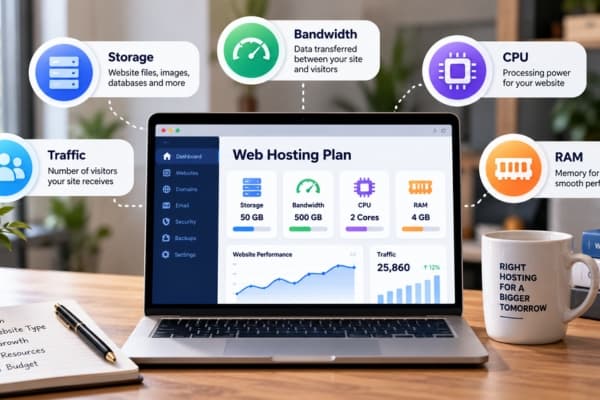
Hosting also affects growth. A basic plan may be enough when you first launch, but increasing traffic, additional website features, or a growing online store can require more storage, processing power, and bandwidth.
The right provider should therefore support your current requirements while giving you room to expand.
Which Type of Hosting Should Small Businesses Choose?
There are several hosting models available, and each provides a different balance of cost, performance, and control.
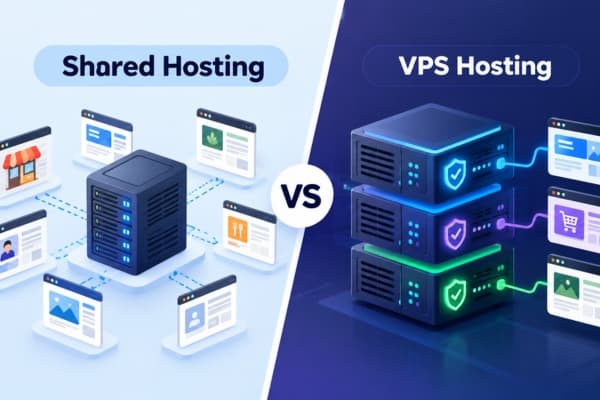
Shared Hosting
Shared hosting places multiple websites on the same physical server. Each account shares the server’s processing power, memory, and other resources.
This is often one of the most affordable hosting options and can work well for a new small-business website, portfolio, local service company, or blog with modest traffic.
The main limitation is that resources are shared. A growing website may eventually need a more powerful solution.
VPS Hosting
Virtual Private Server hosting still uses a shared physical server, but each customer receives a separate virtual environment with allocated resources.
VPS hosting can provide more consistent performance and greater control than basic shared hosting. It may suit businesses experiencing increasing traffic or running applications that need additional server resources.
However, VPS plans can cost more and may require additional technical knowledge depending on whether the hosting is managed or unmanaged.
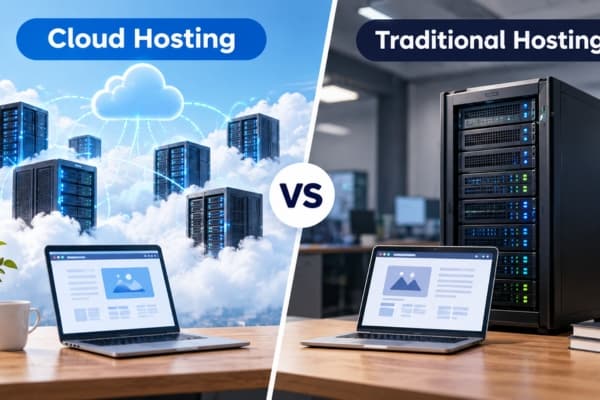
Cloud Hosting
Cloud hosting distributes website resources across a network of servers rather than relying entirely on one machine.
This can provide greater flexibility when website traffic changes. Additional resources can often be allocated when required, making cloud hosting useful for growing businesses and websites that experience seasonal traffic.
Pricing structures vary, so businesses should check whether costs are fixed or based partly on resource usage.
Dedicated Hosting
Dedicated hosting provides an entire physical server for one customer.
It offers a high level of control and resources but is generally unnecessary for smaller websites. It is more commonly suited to high-traffic websites, larger online stores, and organizations with demanding technical or security requirements.
For many small businesses, shared, managed, or cloud-based hosting provides a more practical starting point.
Key Features to Compare
Hosting plans can look similar at first, but the included features can vary considerably.
Uptime and Reliability
Uptime measures how consistently a website remains available.
Hosting providers commonly advertise uptime guarantees such as 99.9%. While no hosting service can guarantee that technical problems will never happen, strong infrastructure and reliable support can help reduce disruptions.
For businesses that rely on their website for bookings, leads, or online sales, reliability should be an important comparison point.
Website Speed
Page-loading performance can influence how visitors experience your website.
Look at the technologies included with the hosting service, such as SSD storage, caching, optimized servers, or Content Delivery Network integration.
A CDN can distribute copies of your website content across multiple locations, allowing visitors to receive content from infrastructure closer to them.
SSL Certificates
An SSL certificate helps encrypt information exchanged between your website and its visitors and enables HTTPS.
Many hosting plans now include basic SSL certificates at no additional charge. Check whether SSL is included, how it is activated, and whether renewal is handled automatically.
Backups
Mistakes, failed updates, or security incidents can damage a website.
Automatic backups provide copies that may allow the site to be restored if something goes wrong. Before choosing a plan, check how often backups occur, how long they are retained, and whether restoring a backup costs extra.
Security Tools
Hosting security may include malware scanning, firewalls, DDoS protection, login security, and automatic software updates.
Not every small website needs the most advanced security package, but basic protections should be part of your comparison.
Customer Support
Technical problems sometimes occur even with well-managed websites.
Consider when support is available and which contact methods are offered. A provider with accessible assistance can be especially helpful for small-business owners who do not have their own technical team.
Should Your Domain and Hosting Be With the Same Provider?
Buying your domain and hosting from the same company can simplify setup.
The provider may automatically connect the domain to the hosting account, and both services can be managed through one dashboard. You may also have one support team to contact if something goes wrong.
Keeping the services separate can provide additional flexibility. For example, you might prefer one company’s domain-management tools while choosing another provider for hosting performance.
Either setup can work well. If you keep them separate, you will generally need to configure the domain’s DNS or nameservers so that it points to the correct hosting service.
Understand the Full Cost Before Choosing
Introductory pricing can make a hosting plan appear inexpensive, but the first advertised rate does not always represent the long-term cost.
Check the standard renewal price as well as charges for:
- Domain registration and renewal
- Hosting renewal
- SSL certificates
- Backups
- Professional email
- Domain privacy
- Security tools
- Website migration
- Additional storage or resources
A slightly more expensive plan may offer better overall value if features you need are already included.
Long-term pricing becomes especially important because moving an established business website to another provider can take more work than switching plans before launch.
Think About Where Your Business Is Going
A new website may initially receive only a small amount of traffic, but your requirements could change.
You might eventually add online payments, appointment scheduling, customer accounts, videos, downloadable files, or a larger product catalog. Marketing campaigns can also produce temporary spikes in visitors.
Check whether the hosting provider offers straightforward upgrade paths. Being able to move from an entry-level plan to a more powerful hosting option can help you grow without immediately migrating your website elsewhere.
Bottom Line
Domain hosting gives your business both an online address and the infrastructure required to make your website available to visitors. While your domain establishes your online identity, your hosting service has a direct role in website reliability, performance, security, and scalability.
For many small businesses, the right starting point is not necessarily the most powerful hosting package. Instead, look for a plan that provides reliable uptime, adequate performance, SSL protection, backups, accessible support, and enough resources for your current website.
Just as importantly, consider renewal costs and future upgrade options. Choosing a hosting setup that can scale with your business can make it easier to expand your website without having to rebuild your technical foundation later.